
Main Tab
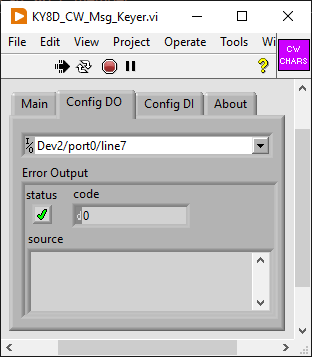
Config DO Tab
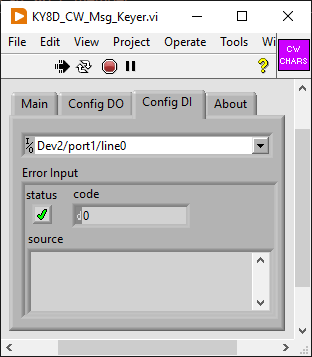
Config DI Tab
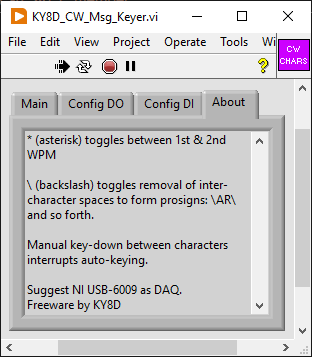
About Tab
A free, open-source CW keyer.
Version 2023-05-11
A Morse code keying program for cranking out CQs at intervals until getting an answer. I wrote it to emulate how I send CQs on a hand keyer, giving my 3rd call sign repetition always slower. Something I do to invite QRS replies from new ops.
\AR\
*.cfg file on exit for re-use next session.|
|
|
|
|
Comes with default example text. Change to whatever else that you like. Your changes will be preserved in a config file named KY8D_CW_Msg_Keyer.cfg, and re-loaded on next start-up.
In the CW text, note the asterisks. A single asterisk toggles speed on alternate playbacks. Two asterisks will toggle speed fast/slow or slow/fast within a playback.
Note also the backslashes. Use always in pairs. A pair will toggle off/on then on/off removal of inter-character spaces, thereby to create any prosign.
Choose a single output port on the DAQ of your choice. This will need to be open-collector. Must handle the voltage and current supplied by the transmitter. Measure first with a DMM. On my Mission RGO One, it is 3.3V and very low current.
My choice of DAQ is an NI USB-6009. I use Port 0, Line 7.
A convenience for interrupting the CW message output by means of the Morse key. Key down manually while the keyer is sending and it will stop. Does so by sensing an outboard key-down during a programmed key-up. Which is to say, during the space between any two characters (at slow speeds, even between dit and dah).
Choose a single input port on the DAQ of our choice. This should be same voltage range as for the DO.
My choice of DAQ is an NI USB-6009. I use Port 1, Line 0.
Just a text window of help instructions.
Unlike my other programs (mostly just calculators) this one needs hardware. Also a driver for said hardware. My choice for this project was the National Instruments model USB-6009. Why? Because I had one already. It's major overkill for a project like this, though. At some point I'll try to figure it out on an Arduino instead.
|
|
On start-up, the VI (for Virtual Instrument, call it an Ap if you prefer) will read in a tab-delimited, spreadsheet file: KY8D_CW_Msg_Keyer.cfg. If said *.cfg file is absent or mis-configured, then a pop-up will complain about that. Default values will then substitute for the missing info. Make edits as needed, then click the EXIT button, afterwards restart, and all will be well.
The *.cfg file which it wants to read in is configured like so...
^[0-9]{1,2}\t[0-9]{1,2}\t[0-9]{1,2}\t[0-9]{1,2}\t.*$
...said format according to RegEx (Regular Expression) formating. On reading in, the VI checks the content against that RegEx before attempting to parse it. In plain english, the RegEx describes a speadsheet array of five tab-delimited cells, the first four containing values 1 through 99 (in the same order as white boxes on the VI GUI). The final cell is text for the bigger white box beneath the four numeric ones.
Refer to the List of Features section above for how to toggle between WPM speeds using an asterisk and/or delimit prosigns with backslashes inside the 5th cell. Line returns are alowed, those being treated as spaces. Avoid any TAB characters inside the 5th cell, as it and any text to follow will be wholly ignored.
You’ll need three things for it to run: my *.exe application itself, plus also the interpreter program on which it runs. Kind of like Java that way, except that the Java interpreter is probably pre-installed on your system. The LabVIEW run-time engine will not be.
ky8d.net/free where I give download instructions. ZIP archive software (like 7-Zip ) for extracting the *.exe file. Otherwise, Windows will issue dire warnings of an unrecognized app. Once extracted from out of its archive, however, Windows will know to pass it off to the LabVIEW Run-Time Engine instead.Latin for “Let the moocher beware”. I composed this for me, and employed it with glee. I share it here with you for free, but offered without even so much as the smell of a dead warranty (or wheriot, as the case may be). Whatsoever disasters of cosmic proportion as may result from the use of this information, any and all culpability rests wholly and solely with the user.
My contact email and postal address are on QRZ.com for call sign KY8D
