Random Wire Calculator
A free, open-source calculator. Extremely versitile, with all variables at users control.
Other calculators exist, but none which offer full user control of all possible variables. Choose any combination of bands. Choose any portion of any band. Narrow or widen the tolerance. Play with any variable while program re-calculates continuously in a loop.
|
|
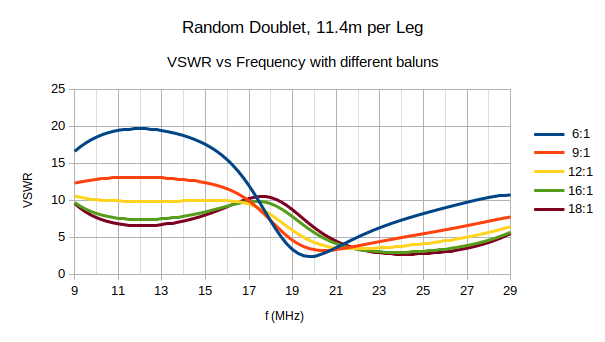
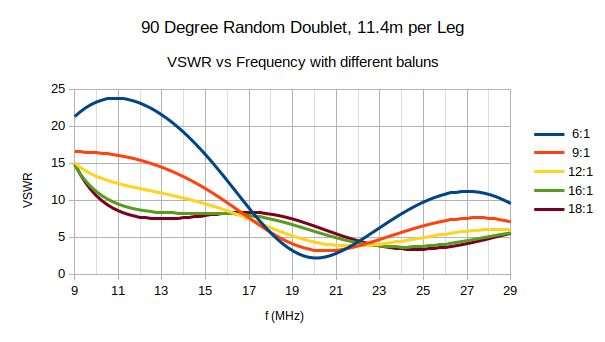
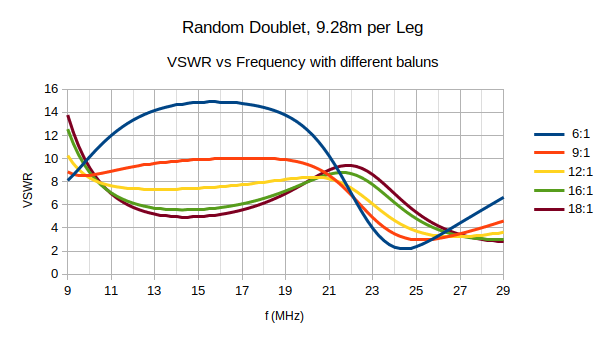
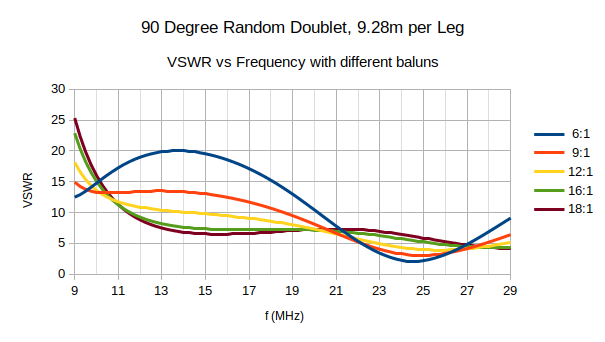
Random_Antenna_Lengths.txt as convenience.Just by way of ad-hoc comparison, here are the VSWR plots* of two non-resonant antennas, as follows:
A wee bit longer than the 11.35m length showing in the calculator on account of using different wire: in this case, 20AWG with PTFE insulation.
The usually specified balun for non-resonant antennas is 9:1. The graph below exzemplifies why. In this particular case, a 12:1 might would serve somewhat better in this particular case. But not by enough of a difference to warrant the extra turns on ferrite torroid. Note that even with a balun, still we are far from 50-Ohms Z. An antenna tuner is still required, but with most of the work already done.
|
|
|
VSWR analysis performed using AN-SOF antenna simulation software: Link . Prettier graphs were obtained by exporting data from AN-SOF into OpenOffice Calc.
A somewhat more convenient length, again employing 20AWG with PTFE insulation.
|
|
|
Common usage pairs a 9:1 balun or unun to non-resonant wire antennas, giving a false impression that the Z is uniformly 450 Ohms on all bands. This is simply not the case. Far from it, as is clearly evident in the graphs above. The choice of a 9:1 is as a compromise. For the two lengths of 11.4m and 9.28m, a 12:1 balun looks to be better. That aside, the above are clearly not wide-band antennas. Each will require an antenna tuner. All the balun accomplishes is to lower SWR enouigh so as to reduce losses in the feedline.
Consider the Chameleon Encomm III portable antenna. Encomm advertises, very impressively, full bandwidth across all bands. They achieve it as a trade-off against efficiency. The UnUn employed is a 5:1 binocular type, similar to the binocular core transformers in multi-band HF amplifiers. Wide-band, yes ... but also lossy. Not so very bad a thing, provided you are aware of the trade-off and do willingly accept it.
In contrast to binocular cores, torid-core baluns and ununs are distinctly more efficient. Their higher Q is a good thing, for certain. But once again, not without cost. Toroid transformers exhibit much narrowerbandwidth. Thus, everyone’s mileage will most certainly vary.
Closing note: The OEMs of wide-band antennas generally do not publish their loss figures. Still you may infer it by a given model’s max power rating. Which is to say, its heat dissipation capacity. There is where the losses occur, most likely within the ferrite core. Losses, as mentioned, going both ways: on receive as well as transmit. Which, in return for convenience, you might deem an entirely worthwhile trade-off. This as opposed to sacrificing all-band flexibility.
See also these websites on the same topic:
You’ll need two things for it to run: my *.exe application itself, plus also the interpreter program on which it runs. Kind of like Java that way, except that the Java interpreter is probably pre-installed on your system. The LabVIEW run-time engine will not be.
ky8d.net/free where I give download instructions. ZIP archive software (like 7-Zip ) for extracting the *.exe file. Otherwise, Windows will issue dire warnings of an unrecognized app. Once extracted from out of its archive, however, Windows will know to pass it off to the LabVIEW Run-Time Engine instead.Latin for “Let the moocher beware”. I designed this for me, and used it with glee. I share it here with you for free, but offered without even so much as the smell of a dead warrantee (or wheriot, as the case may be). Whatsoever disasters of cosmic proportion as may result from the use of this program, any and all culpability rests wholly and solely with the user.